
Any employee or team member who has developed or wishes to sponsor a new agent can initiate the registration process. For the initial release, the agent must be built using the A2A protocol (Google’s agent protocol); the Langchain-based Agntcy protocol is not supported at this time. When considering the creation of a new agent, carefully evaluate its scope, whether an agent is needed as opposed to a standalone project, and if data should be added or cleaned in existing databases known to WDChat. Check if a similar agent already exists in the WDChat agent register, and assess factors such as expected usage frequency, target user base, security and data handling requirements, as well as ongoing maintenance and long-term ownership responsibilities. Careful planning in these areas will help ensure your agent is valuable, unique, and ready for successful integration into WDChat.
Empowering AI Builders
Your structured pathway to integrating custom AI tools and agents in WDChat
Introducing agent registry
Agent Registry is a submission process for employees to get their remote agents approved and integrated with WDChat. It's designed to make it easy for AI enthusiasts to expand WDChat's functionality, ensuring innovative ideas flourish within a balanced, secure framework. This is a major leap forward in WDChat's journey to becoming a truly dynamic platform for AI builders.
What is a remote agent?
An agent in WDChat is designed to interact with data sources, APIs, other agents, and WDChat itself to accomplish specific goals or complete tasks. Agents can handle complex workflows by breaking them down into manageable steps and executing them autonomously. In WDChat, both built-in and remote agents—created by employees for tasks such as data processing or automation—extend the platform’s capabilities by providing specialized functionality, adding new features, or enhancing existing ones. This helps make processes smoother and more efficient.
Note: While "agent" can mean many things, here it refers specifically to these independent components that integrate with WDChat.
Why register your agent? Glad you asked.

Built for Western Digital, by Western Digital
The registry empowers you to create solutions tailored precisely to Western Digital’s unique needs. By registering your custom agents, you make WDChat more actionable and maximize productivity by helping users with their day-to-day work.

Innovation unleashed and organized
Fuel homegrown innovation by easily integrating and activating custom agents, optimizing workflows, and boosting productivity within WDChat.

Foundation for the future
Be part of the first step towards a larger vision that includes text-prompt agent building, automated workflows, a future drag-and-drop interface for all users, and agents seamlessly orchestrated for all employees using the A2A protocol.
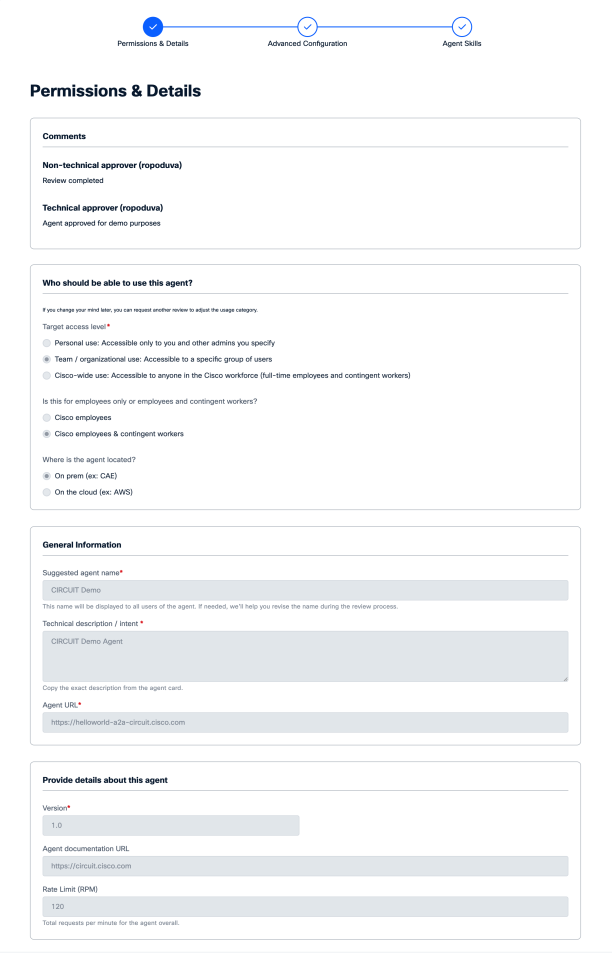
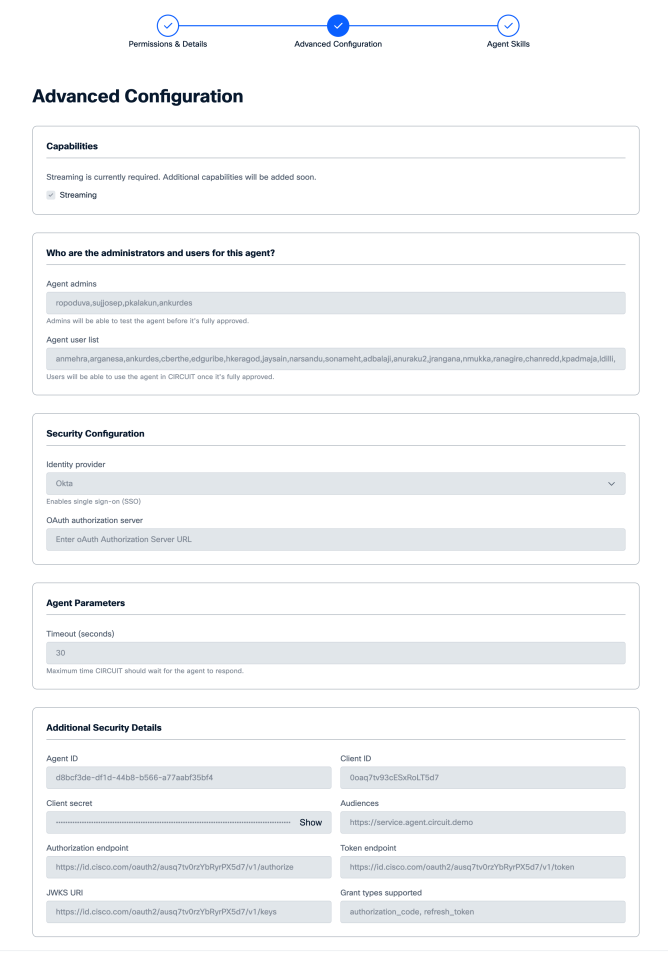
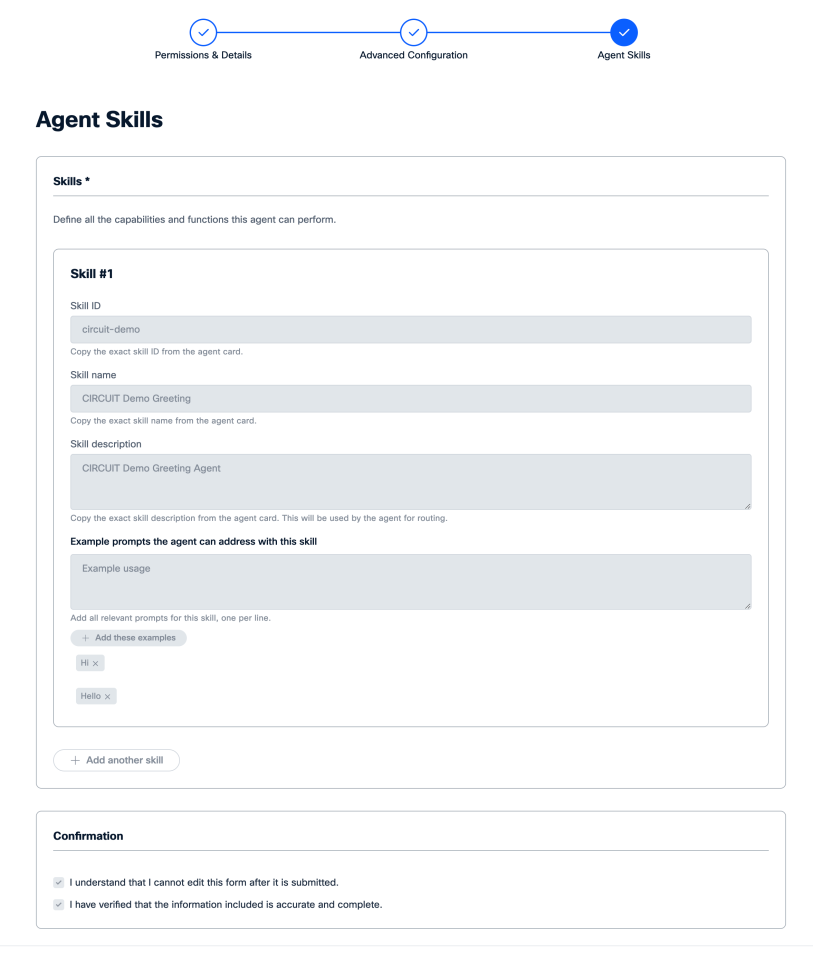
Agent registration & approval process: What to expect
The registry is designed to support employees passionate about AI, helping them expand WDChat’s functionality with their own creations, and turning personal tools into enterprise-wide assets.
If you are registering your agent, here’s an outline of the steps your submission will go through, so you know what to expect and how to prepare:
Agent Form Registration Example
FAQS
How do I start the agent registration process?
- Build an agent using A2A protocol. Other protocols like AGNTCY will be accepted at a later date. [K(1]
- Register your agent with OneAI. The OneAI team will evaluate the agent according to
- Conflicts with other agents: Does the agent overlap with another agent?
- Clarity of use: Is the use of the agent clear?
- Test the agent within OneAI.
What are the minimum requirements to register and be approved for an agent?
To register an agent in OneAI, it must be A2A compliant using the A2A protocol for secure, standardized communication and seamless integration. Your agent must also implement OAUTH 2.0 for secure authorization, provide unique value (not duplicating existing agents), support streaming if needed, and be accessible via secure authentication such as OKTA.
What is A2A?
A2A (Agent-to-Agent) is a standardized protocol for secure and efficient communication between agents and OneAI. It defines how agents exchange data, handle authentication, and ensure interoperability within the OneAI ecosystem.
How does authorization between WDChat and agents work?
Authorization between OneAI and agents is handled via OAUTH 2.0. This protocol securely manages authentication, ensuring that only authorized users and systems can access your agent’s capabilities.
Does registering my agent mean WDChat will host my agent?
No, registering your agent does not mean OneAI will host it. Your agent can be hosted on any secure cloud platform, as long as it is securely accessible by OneAI and meets all compliance requirements.
My agent has workflows with unique Ul elements (form fields, pick lists, etc.). How will these show up in WDChat?
OneAI dynamically renders UI elements such as form fields and pick lists based on the metadata your agent provides. Ensure your agent defines these elements clearly so they are displayed correctly within OneAI’s user interface.